Showing posts with label DOWNLOAD WORLD. Show all posts

Microsoft Toolkit 2.3 b9 (Windows and Office 2010 Activator)

Dec 15, 2011 | comments

This is the Ultimate Office and Windows Activator AIO tool. It will activate Microsoft Office and Windows 7 via KMS style activation. This will activate all versions of Microsoft Office 2010 and Windows 7

Requirements:
Microsoft .NET Framework 4.0
Office 2010 for Office Support
Windows NT 6 era operating system (Vista or later) for Windows Support

Microsoft Toolkit Changelog:
BETA 9
-Added function to download and integrate all updates in Customize Setup
-Fixed Product detection issues in Customize Setup

BETA 8
-Added Permissions Fix during a Restore and Improved Office Rearm Check Success Rate
-Added Program Update Check on Startup
-Added support for UDF Office ISO\\\\\\\'s
-Added Functions to directly Check and Show Keys in the DigitalProductID.
-Channel Changing does patching via code instead of using xdelta3.exe and no longer needs to write patches to disk
-Customize Setup disables channel change button if setup.exe is not from Office 2010, so you can use it to integrate Office 2007 Updates/Languages.
-Enhanced error checking/messages on KMSEmulator failure.
-Fix MAK Activation Count always failing
-Fix Restoration of Phone Activation ending up in grace
-Fixed Scheduled Tasks not running as SYSTEM
-KMS PID is set before start instead of editing process memory when using manual Activation
-Preliminary Windows 8 Key Decoding
-Removed options and unnecessary fixes from EZ-Activator
-Scheduled tasks now keep the last run time and result
-Timing of Activation Restore
-Updating Settings or PID via EZ-Activator will update AutoKMS/AutoRearm.
This is because changing settings but not the EXE could cause a INI mismatch so AutoKMS/AutoRearm would revert to default settings.
-Using ReSharper for automatic code refactoring

Alpha 1 R7
-Fixed checks that disable functions

Alpha 1 R6
-Fixed Scheduled task install failure.

Alpha 1 R5
-Added IR5 detection
-Added MultiKMS
-Added Office/Windows Product detection in Main tab
-AutoKMS and AutoRearm show their version in the log
-Backups are sorted by OS/Office and show up as a list. Move old backups to new folders to use them.
-Can install AutoRearm alongside AutoKMS, allowing AutoRearm to be a failsafe.
-CMID change and Office Repair disabled by default in EZ-Activator. If the PID fix doesn\\\\\\\'t work you probably have an issue that these won\\\\\\\'t help.
-Disable and check Save/Restore keys in Windows since Windows backup needs this.
-Fix tokens permissions on restore in case of bad permissions.
-Key Checker doesn\\\\\\\'t require Office or Windows Vista+ to use.
-Key Checker gets remaining MAK count if a MAK is checked. Requires Internet connection or will not work.
-Key Checker is a bit faster.
-KMS PID\\\\\\\'s coded in the app can be selected in Settings as a list.
-More products supported/consolidated in Key Checker.
-Improved AutoRearm detection of activated Office.
-Improved Windows backup failsafe.
-Removed Selector UI
-Scheduled Tasks will be Vista on Vista+ OS instead of XP. XP will still use XP tasks.
-Silent switches added for MultiKMS, Backup and Restore of Office and Windows, and Windows EZ-Activator. NOTE: /SaveKeys switch on Backup may require user interaction to get the key.
-UI changed on CID/Key Prompt boxes.
-Various improvements, bugfixes, and techniques to optimize the apps and minimize AV false positives.

Alpha 1 R4
-Vista Support Detection

Alpha 1 R3
-Windows Backup enhancements
-Reinstall Keys

Alpha 1 R2
-Windows Volume detection bugfixes
-Not using .NET Reactor
-Windows Backup tweaks
-Reinstall Keys Selected by default

Alpha 1
-Windows UI/Functions


TO DOWNLOAD
:-
CLICK HERE

OR

CLICK HERE

OR

CLICK HERE
AVS Document Converter 2.0.1.164

Dec 9, 2011 | comments (1)


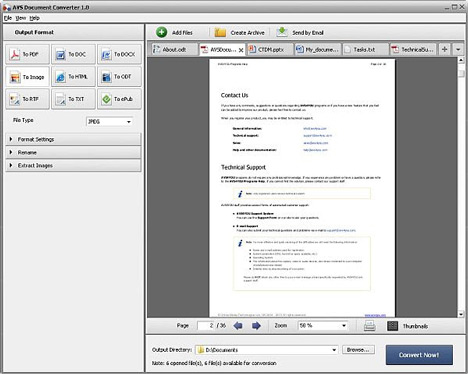
AVS Document Converter is designed to view and convert various types of documents. It reads text and image files and converts them to PDF, DOC, DOCX, RTF, TXT, ODT, HTML, JPEG, TIFF, EPUB and other formats....!


DOWNLOAD LINK :-
CLICK HERE
OR
CLICK HERE
OR
CLICK HERE

PC-Doctor Factory Express v5.1.5461.00

Dec 8, 2011 | comments


Designed for small-to-medium volume manufacturers and service/repair centers, PC-Doctor Factory Express for Windows gives you the same Windows diagnostics and features used by major OEMs. Providing all the automation capability and powerful scripting previously only available to our contract customers, PC-Doctor Factory Express can take your PC or PC-type device business to the next level of quality and automation.

Target Users
• Small-to-medium system builders
• Enterprise PC service organizations
• Small-to-medium repair and support centers or depots
• Major manufacturers with small-scale design or repair/support centers

Product Includes
* PCI POST card
* USB test device
* Power supply tester
* Downloadable product documentation
* USB license dongle (required for diagnostic product use)
* Downloadable PC-Doctor IT Toolkit GUI-based XML script editor
* Downloadable PC-Doctor Factory Express for Windows diagnostics with command line and GUI interfaces
* Five loopback devices for RJ45 ports, game, serial, audio and parallel ports

Key Benefits
- Reduces out-of-box failures
- Reduces troubleshooting time
- Saves testing time by automating the test process
- Verifies service quality for service and repair centers
- Reduces end user returns by verifying system configuration and quality in manufacturing
- Reduces cost by providing system validation before the system is delivered to your customer

Key Features
» Full automation using command line options
» One-time purchase with low minimum volume requirement
» Easy-to-use graphical script editor for creating XML test scripts
» The same full-featured, world-class diagnostics used by major OEMs
» Factory/service GUI available for monitoring at the system under test
» System information and test results can be stored as TXT or XML files for extended reporting and tracking
» Extensible integrate existing test applications using the exclusive middleware module to consolidate testing into one test run
» First year maintenance and support included in purchase price; optional maintenance and support for subsequent years may be purchased to receive software updates and product support
» Fully compatible with Windows 2003 and above including Windows Vista and PE


TO DOWNLOAD :- CLICK HERE

Network Security Toolkit (NST) 2.13.0-1713 [x86]

| comments

Network Security,NSTNetwork Security Toolkit - this is one of the many Linux distributions, such as Live CD, to analyze network security.NST gives administrators easy access to a broad set of open network applications, many of which are included in the hundred best security tools recommended by the site insecure.org.The latest version of NST - 2.13.0 was released in January 2011.This version is based on Fedora 13 uses the kernel Linux 2.6.34.7-56.fc13 with the desktop environment Fluxbox.
When booting from the Live CD you will be prompted to download several versions for different hardware capabilities or the required services, including the PLOP.The default option - "desktop / laptop", which includes all utilities NST, USB support and console.All versions require a working DHCP-server, otherwise you'll have to enter the network settings manually.

You can install the NST and the hard drive, but this process is not so simple.In large organizations, is absolutely necessary to continuously monitor network activity and security, so install the NST to the hard drive will be extremely useful.
By the way, the assurance of the developer when a new version of the emphasis was on visual geolocation, which is shown in the screenshots.

So, Paul Bleykenbeyker (author) made a bid to create a framework to bind to the location and display the network checks with reference to geopozitsii (for example, a map of the route of packets can be displayed through the service of Google Earth).Utility ntop expanded opportunity to show the geographical location host.Prepared by the tool for locating IP-addresses of intercepted traffic to their subsequent display on the map Google Earth and the formation of a static image maps.

Among other things, users of Fedora Linux are able to install all created in the NST project experience in the form of packets.
What's inside him?

Let unassuming appearance Fluxbox does not confuse you.Although the interface is easy and simple, but it is available from a number of powerful network tools.Of protection from network intrusions can be mentioned Kismet, Snort, AirSnort, NMAP and Wireshark.Nessus - a popular vulnerability scanner, which has not been given attention in the last BackTrack-release (BT3), this time is included in the distribution.Help you monitor the status of network programs such as Nagios, Argus and Zabbix.

In addition to these administrative remedies, the distribution includes also the user of the program - an email client (Pooka), instant messaging client (Pidgin), Web browser (Firefox), means for processing text and graphics (ImageMagick, XPDF, Nedit and other ), antivirus (ClamAV), communication terminal (GTKterm, Minicom), Remote Desktop (VNC, TSClient) and data recovery tools (cfdisk, Partition Image).I was surprised to find in the distribution-free program for GPS-navigation GPSDrive.Yet included MySQL and PostgreSQL, but if you need a mail server - at your service Sendmail.

To run the programs included in the NST, you can use a Web interface (Web user interface, WUI), based on AJAX and JSON, or choose from a menu Fluxbox.If you know what you're looking for, just click the right mouse button on the desktop - Fluxbox menu appears with all the programs that are separated by category.For example, all image checker system vulnerabilities can be found in sub-Security Applications, and common tools for the network (such as Wireshark) located in Network Applications.You can blame the developers NST Fluxbox menu that some programs are present simultaneously in different categories, for example, the application is in the sub ATerm NST WUI and Desktop Applications.

If the program does not have a GUI or console requires for its setting, NST easier to work with it by placing it in the WUI.You can choose a simplified WUI, in which programs are grouped according to the problem to be solved (sniffing, monitoring or checking for the invasion), and from the categorized list.

WUI simplifies the use of programs.When choosing a program or task, you will be shown a page where you want to select a specific script - to set up or operation.If you want to change your settings, this can be done easily by editing the configuration file or by entering the command parameters.On the page of each program also has a brief description and documentation.

Additional information: The user password root "nst2003".


Download Link : PART 1
PART 2
PART 3
PART 4
PART 5
PART 6

6 New Super Hyperdesk Themes for Win7 x86x64

| comments

Hyperdesk is an exciting new product from The Skins Factory that allows you to transform the appearance of your regular Windows desktop, with an endless array of exciting new desktop themes, skins, wallpapers, widgets and other applications called "hypersuites".

Using Microsofts own skinning engine, Hyperdesk uses a "native" and stable way to theme Windows. Because the magic of Hyperdesk occurs entirely in memory, your system files are never touched or replaced. And just as it takes a single button to make the magic happen, a single click will return you to your default Windows desktop.

Each Hyperdesk installation contains a custom hypersuite. These works of art have been painstakingly, hand-crafted by the worlds most talented commercial interface artists at The Skins Factory, with the same attention to detail & flawless execution weve become known for throughout the industry.
Installation instructions:

1. Install
2. Run appears on the desktop shortcut
3. You choose how you want to look theme, icons, wallpaper, uidget, media player skins
4. Click "Apply Hyperskin" and wait. The mouse cursor will freeze for a few seconds
5. When you want to remove the skins drop shortcut again and choose Restore Windows 7
6. Enjoy

DOWNLOAD LINK :- PART 1
PART 2
PART 3
PART 4
PART 5
PART 6

Photoshop Tutorials and Tricks – Tutorial eBook

| comments

Photoshop Tricks
This book contains 1000 cool photoshop effects and tutorials. Pictures are included along the way, along with descriptive explanations of each step.

- Motion Pictures
- Turning a Character Into a Puppet
- Out of Bounds
- Creating Rain
- Creating a Wormhole
- Creating Fur
- Motion Tweens and Guides [flash]
- Making Graffiti
- Turning a Character Into a Zombie
- Perspective
- Gender Blending
- Face Swapping
- Tattoos
- Displacement Maps and Textures
And many, many more!


TO DOWNLOAD :- CLICK HERE
OR
CLICK HERE

Driver Genius 10

Nov 26, 2011 | comments


Version: 10.0.0.712
Developer: Driver-Soft Inc.
Platform: Windows 2000/XP/2003/Vista / 7 (32/64 bit)
Compatible with Seven: full

Driver Genius is a professional tool for backing up or restoring the drivers, it can fast detect all the devices in computer and backup the drivers, and it can make the drivers into the zip-compressed format or self-extractor format files. When you reinstall the operation system, you can use restore-drivers function to restore all the drivers. You need only click the mouse, and then the drivers will be installed into your system automatically. Certainly, you can also make the drivers into an auto-install package, in this way, the drivers installation is as simple as the other software installation. It has the simple wizard mode and even beginner can also use it easily.

Featuress:

# Backup your drivers to a ZIP or EXE self-extracting file.
# Clone your drivers to an auto-setup package.
# Wizard mode allow you step by step backup or restore your drivers.
# Get detailed information about your installed devices.
# Search for drivers for non-internet connected computer.
# Easy to get the most recent drivers for your computer.
# Search all available drivers update by one click.
# Liveupdate your drivers information database online.


Improvement:

1. Driver scan scheduler – schedule regular scans to ensure your drivers are always up-to-date.
2. Download Verification – auto-checks downloaded drivers to ensure complete downloads.
3. Driver download location can be set by user.
4. Automatic removal of out of date drivers from download manager.
5. Driver scan accuracy. Now provides more accurate information about out of date drivers.
6. Thousands up updates and additions to the Driver Database.
7. One-click driver installation. Install multiple drivers with a single click.
8. Driver downloads are faster and more reliable.
9. User interface enhancements make Driver Genius easier and more convenient than ever.

DOWNLOAD LINK :--

http://adf.ly/3t7V0

Spyware Doctor 2011

| comments

Spyware Doctor with AntiVirus delivers powerful antivirus and antispyware protection without slowing down your PC.12 Defends your PC against malware attacks utilizing Advanced Detection Intelligence with multiple techniques that provide proactive, reactive and automated protection to stop threats at every entry point. These techniques include:

ThreatFire Behavioral Intelligence blocks new threats faster than traditional signature methods by scanning and analyzing computer processes to accurately detect and block malicious activity

Advanced rootkit detection technology identifies and removes hidden threats

Browsing protection against web-based attacks, including phishing attempts, rogueware scare tactics and silent drive-by downloads, using reactive blacklists and proactive dynamic content analysis

Constant real-time IntelliGuard protection prevents known and new malware threats from installing on your PC and potentially causing harm. IntelliGuard monitors for malicious activity involving spyware processes, tracking cookies, suspicious ActiveX objects, browser hijackers, keyloggers, trojans and more

Intelli-Scan swiftly hunts and kills active spyware threats utilizing patent-pending spider scanning technology

Smart Updates silently and automatically installs protection updates and product upgrades to ensure continued powerful protection against the latest threat outbreaks.

Spyware Doctor with AntiVirus features powerful protection that fits your needs. With minimal performance impact and the ability to tailor protection settings, Spyware Doctor with AntiVirus provides the tools you need without the complexity. State Awareness Modes intuitively detect how you are using your PC and adjusts to reduce interruptions. Intelligent automated protection is enabled for optimizing protection on install so you can set and forget. Includes 24/7 phone, web and email support during your subscription period.

DOWNLOAD LINK :---

http://adf.ly/3t7QB
OR
http://adf.ly/3t7Rj
OR
http://adf.ly/3t7T8
 
Support : INDIATRIKS
Copyright © 2011. INDIATRIKS - All Rights Reserved
Template Edited By Indiatriks
Proudly Powered By Blogger